
I like to venture into the unknown without time constraints, estimates, or deep planning. Let my mind wander and see what AI can help me create. I’ve been a software engineer for decades and have a high quality bar. I don’t want to disregard it, but I also want to flow, experiment, pivot, build, and deliver.
/tasky helps me do that.
Tasky is a Claude Code skill that manages projects, roadmaps, milestones, and tasks through natural conversation. No commands, no slash syntax beyond the initial /tasky to activate it. After that, you just talk.
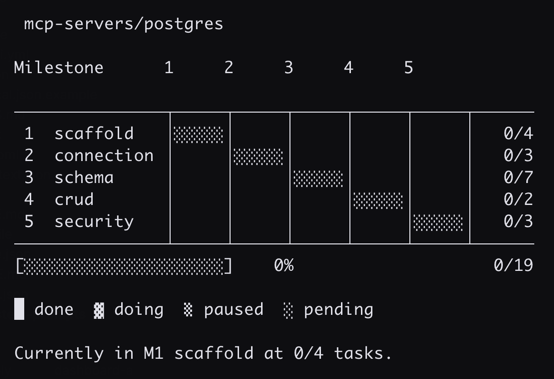
Most AI PM tools want you to write the PRD first, plan out every detail, estimate timelines, and then execute. That works when you know what you’re building. Tasky is for when you don’t. You have an idea, you know roughly what it needs, and you want to start pulling on threads. Tasky keeps up with that instead of slowing it down.
It tracks progress by what’s been built, not by hours or dates. Specs get deferred until needed. And the whole project can be restructured mid-stream without everything falling apart.
The hierarchy
Work lives as a simple structure:
project → roadmap → track → milestone → taskA project is the top-level initiative. Roadmaps are major phases or versions. Tracks are parallel workstreams. Milestones are deliverable checkpoints. Tasks are the atomic units of work, each one a markdown file with checkable criteria.
The task is the only file tasky manages. Everything above it is just a directory. Status rolls up automatically from tasks through milestones, tracks, roadmaps, all the way to the project level. Nobody has to maintain it.
Tasks are all you need
If I’m being honest, good vibe-coding only needs good tasks. The task name itself can be the scope of work. And
there are many task agents out there. So, at its core, /tasky is just another task manager. That said, it is
tuned to be more than just a todo system. And its designed to give a full-project feel without full project
overhead.
The quality of specs/PRDs usually determine the quality of what’s produced. Sometimes we don’t want to produce all the specs up front but we know at some point they’ll be needed as we zero in on what we want delivered.
And this is the core idea with /tasky. There are no separate spec documents for each piece of work (or at least,
there doesn’t have to be). The task file has criteria that serve as both the instructions and the acceptance test.
# Connection Pooling

Status: DOING
Dependencies: [connect, disconnect]

## Criteria
[ ] Create a pool on first connect
[ ] Reuse connections across requests
[ ] Configurable pool size via env var
[ ] Graceful drain on shutdown
[ ] Health check pings idle connections
Each criterion is specific and checkable. Not “pooling works correctly” but each behavior listed individually. When all the boxes are checked, the task is done. Criteria get fleshed out when the task is about to be worked, not before.
Shared design docs are also supported. Multiple tasks can reference the same doc and each task executes its slice of the larger design. If a task reveals the design was wrong, the doc gets fixed and the next task picks up the correction. But nothing forces that pattern. If the task is self-contained, the criteria carry the whole thing.
How to interact with it
Install tasky:
npx skills add agenticexpert/nimbilityEverything after installation is conversational. Here are the kinds of conversations tasky supports.
Planning
Describe what you want to build and tasky helps find the structure.
I want to build a series of MCP servers for Postgres, SQL Server, Mongo,
and Clickhouse. Each one needs connection management, schema introspection,
and CRUD operations. Let's figure out the structure.
It asks questions. “Does Mongo need the same CRUD as the SQL databases or is it more query-focused?” “Is security its own milestone or part of each connection module?” When there’s enough clarity, it proposes a hierarchy and waits for confirmation before creating anything.
Building the structure
Once the plan is clear, tell it to create everything. As detailed or as brief as you want.
Create the project. Roadmap is mcp-servers. Tracks for postgres, sql-server,
mongo, clickhouse. Each gets milestones: scaffold, connection, schema, crud,
security. Except mongo, replace crud and security with query.
It shows the proposed tree, you confirm, and it builds it. All the directories, all the ordering, all in one shot.
Later when things change, restructuring is just as easy:
Move the auth milestone into a new security track.
Insert a caching milestone before api.
The deployment track depends on backend and frontend.
Defining tasks
Milestones start empty. When one is about to be worked, the tasks inside it get defined.
Define the tasks for postgres/connection. We need: connect using env vars,
disconnect, connection pooling, health check, retry logic.
Tasks start as stubs. Criteria get fleshed out when a specific task is about to be worked. Not before.
Seeing progress
show me the roadmap
what's next?
what's blocked?
view all
Terminal views with progress bars, status, and task counts at every level. A full project tree renders in about a second regardless of size.
Executing
let's work on connection poolingTasky loads the task, checks that dependencies are met, and starts working through the criteria. Checkboxes get checked as criteria are satisfied. If something unexpected comes up, it stops and surfaces it instead of pushing through.
When all criteria are met, the task goes to “ready” and waits for validation. Either confirm or push back on specific criteria.
looks good, ship itPausing and resuming works too. Checked criteria are preserved. When work resumes, it picks up from where things left off.
Flows
Flows customize how tasks get executed. A flow wraps the task with additional steps. The default just executes and audits. Custom flows can add test writing, code review, deployment verification, whatever the task needs.
The default flow is:
# task-standard — Standard Task Flow

PURPOSE: Execute a task and audit results for drift
SCOPE: General purpose — suitable for most development tasks

## INSTRUCTIONS

Before executing this task, fully understand the acceptance criteria. Stay within scope.
If something is unclear, ask before assuming. Small gaps found during execution are fine
to address inline — anything requiring significant effort or a judgment call should be
surfaced to the user first.

## FLOW

1. {instructions}
2. {task}
3. Audit results against the task criteria — confirm each criterion is met, surface any gaps
But you can add your own and just link it up by saying:
attach the path/to/test-driven.md flow to all tasks in the backend trackBrainstorming
When the idea is still fuzzy, tasky shifts into brainstorm mode. It asks about what’s being built, who uses it, what done looks like. It doesn’t rush into structure. When there’s enough shape, it offers to start planning.
I have an idea for a series of MCP servers to service the various databases used in our stack.Its all about the views
view all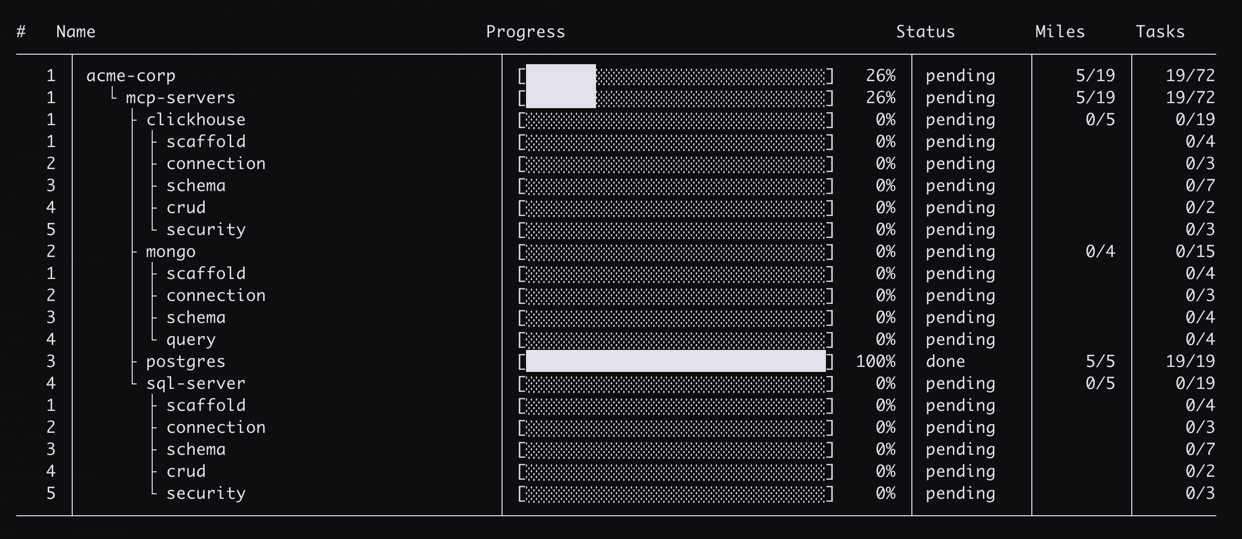
view roadmaps
view roadmap <name>
view tracks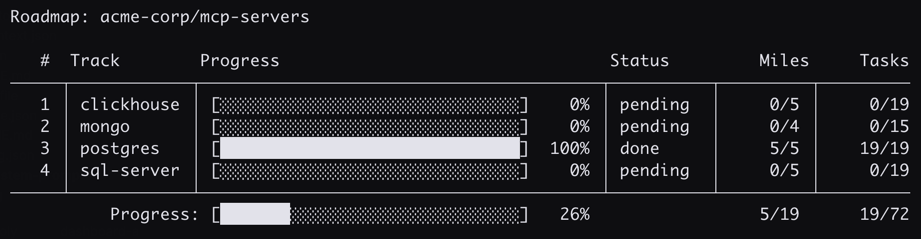
view milestones
view tasks for <milestone-name>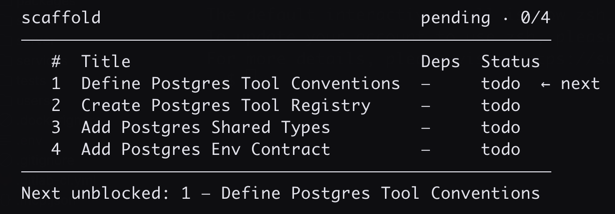
Closing thoughts
Progress is measured by milestones hit, not hours spent. Either the checkpoint was reached or it wasn’t. Discovering 30 more tasks along the way isn’t a setback, it’s the project getting clearer. Add them and keep going.
Tasky supports executing a single task and validating it, or executing a batch and validating the group. The gantt chart visualizes progress without thinking about the calendar or spec completeness. In short, it supports the flow. Charting into the unknown without having to make it known in advance.
This is just a task manager with a way to visualize tasks and write specs when needed. Writing specs first is fine too, nothing in tasky prevents it. But that’s not the default workflow.
Tasky is the first skill in a suite called nimbility. The name comes from keeping things nimble.